P2P

Peer-to-Peer Tunnels

Wisper's p2p mode connects two hosts without a public ingress: peers address each other by base64 public key, traverse NAT with STUN and UDP hole punching, and fall back to a self-hosted DERP relay.

What the p2p layer provides

The p2p layer answers one question: how does host A reach host B through NAT? It takes a peer's public key and returns a TCP or UDP tunnel. Reachability is its scope; access control is the peer whitelist, and the data plane is encrypted end to end — see End-to-end encryption below.

Two roles

Reverse — tunnel type p2p
Peer → Local

Expose a local service to peers only. One process-level host holds the identity; an inbound stream is routed by peer public key to the tunnel's backend, which is a standard GOST service, so it reports the same live stats and byte counters as any other tunnel.

Outbound — entrypoint type p2p
Local → Peer

Reach a peer's target from a local port. A local listener dials through the shared host to the peer's target. protocol selects tcp (a byte stream) or udp (a datagram stream); keepalive holds the session open between packets.

How a session is built

  1. Both hosts open a WebSocket to the DERP relay and register their public key with it.
  2. Each host generates a curve25519 keypair on first run; peers address each other by the base64 public key. There is no name lookup.
  3. The relay forwards packets between the two keys. It can read and drop the bytes it carries, but it holds no key to decrypt them.
  4. Both peers then probe their own NAT — IPv4 via STUN, IPv6 by binding the local egress address — trade the results over the relay, and punch a UDP hole. New tunnels use the direct path (KCP with smux) once it is up.
  5. A punch that fails, as with symmetric NAT, leaves traffic on the relay. The relay is always up as a fallback, and only a new punch needs it reachable.
DERP relay wss · STUN :3478 relay relay Host A wisper Host B peer direct · KCP + smux
Both hosts meet at the relay. Once a hole is punched, tunnels move to the direct path; the relay stays up as the fallback.

Identity and addressing

The process holds one identity, stored in the config directory at p2p/host.key with owner-only permissions, shared by every p2p tunnel and entrypoint. Settings → P2P Identity shows its base64 public key. The key is materialised on demand, so a host can read its own key before anything is running, and two sides can configure each other in either order. The host is reference-counted: it stops when the last user closes, and the key file stays on disk.

Admission: the peer whitelist

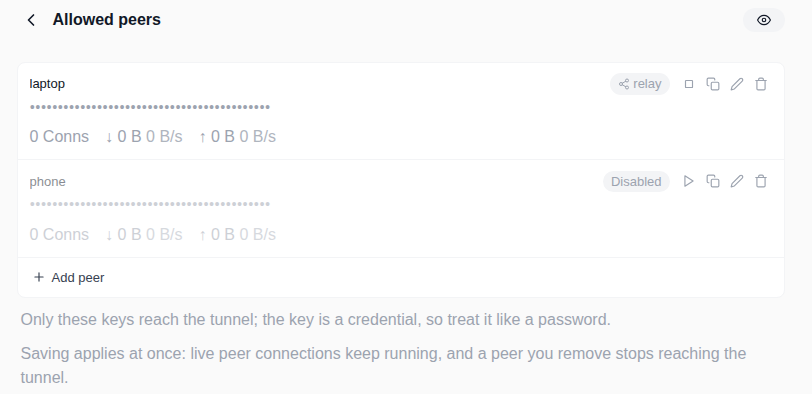
A p2p tunnel lists the peer public keys allowed to reach it, and each listed key registers a route on the process-level host. An inbound stream from any other peer is closed; there is no catch-all and no default tunnel. An empty whitelist is valid — the tunnel runs and appears in the list, but accepts nothing, which fits configuring the identity and backend first. A key may appear in only one p2p tunnel. It can be disabled without removing it: new streams close, established ones end on their own.

Wisper Allowed peers page: one row per peer public key, masked, with a transport badge, live stats, a disable button, and an Add peer button.
Allowed peers: one row per peer public key, masked, with a transport badge and live stats; a peer can be disabled in place.

The direct path

Direct is on by default. Once the relay session is up, each peer collects candidates — IPv4 through STUN, IPv6 by binding its local egress address — and exchanges them over the relay. Both peers then dial at once with the same deterministic key, a mutual simultaneous open. A session is used only after both sides complete the echo handshake, so a half-open path cannot become a direct session. A failed punch backs off and retries while traffic stays on the relay. The STUN address is derived from the relay host on :3478 and probed once before use; the public relay answers no STUN, and IPv6 needs none. Setting direct to false forces relay-only.

Datagram links

A udp tunnel carries datagrams instead of a byte stream. Each dial owns one datagram link, which pairs the dial's stream with an edge to the peer; the datagram that triggered the dial is buffered until that edge opens, so the first packet is not lost. This is the path a tun link takes: GOST owns and configures the tun device, and p2p only moves the packets. There is no inner dialer here; the datagrams are encrypted by the p2p layer itself.

local dial wisper datagram link one per dial peer host local edge peer edge
Each dial owns one datagram link. The first datagram is buffered (32 KiB) until the peer edge opens, so the packet that triggered the dial is not lost.

Transport stats

Status reports whether punching works for each peer. GET /api/p2p returns direct_peers and derp_peers — where each peer's traffic goes now — plus punch_attempts and punch_success, cumulative since start. A punch_attempts that climbs while punch_success stays flat means punching is attempted and failing, the case IPv6 or a port mapping addresses. Per peer, the transport reads as direct, punching, failed, derp, disabled, no-candidates, or stun-unreachable, shown as a badge on the peer list and the entrypoint detail page.

Self-hosting the relay

Wisper connects to wss://derp.gost.run/derp by default; that relay serves no STUN. Self-host with the official derper — run the binary directly, or the official gogost/derper image (multi-arch, tagged per derper version). It serves STUN on :3478 in the same process. Bind it to an explicit IP with -a so STUN listens on the address family peers query.

Binary

derper
derper -c /etc/derper/derper.key \
  -hostname derp.example.com \
  -certmode manual -certdir /etc/derper/certs \
  -a 203.0.113.10:443 \
  -stun -stun-port 3478 \
  -verify-clients=false

Docker — gogost/derper

docker run
docker run -d --name derper \
  -p 443:8443 -p 3478:3478/udp \
  -v "$PWD/certs:/certs:ro" \
  -v derper-data:/home/derper \
  gogost/derper:1.102.3 \
  -a=0.0.0.0:8443 -stun=true -stun-port=3478 \
  -certmode=manual -certdir=/certs -hostname=derp.example.com \
  -verify-clients=false -c=/home/derper/derper.key
The image is multi-arch (amd64 + arm64) and tagged per derper version. -certdir expects files named <hostname>.crt and <hostname>.key; -c holds the relay's private key, auto-generated on first start and kept by the derper-data volume.
-verify-clients=false accepts any client — an open relay. Restrict who can reach it (firewall, private network, or Tailscale client verification). The relay can read and drop the traffic it carries but cannot decrypt it; keep confidentiality in the inner protocol, running tls, mtls, or wss over the tunnel.

Configure in the Wisper UI

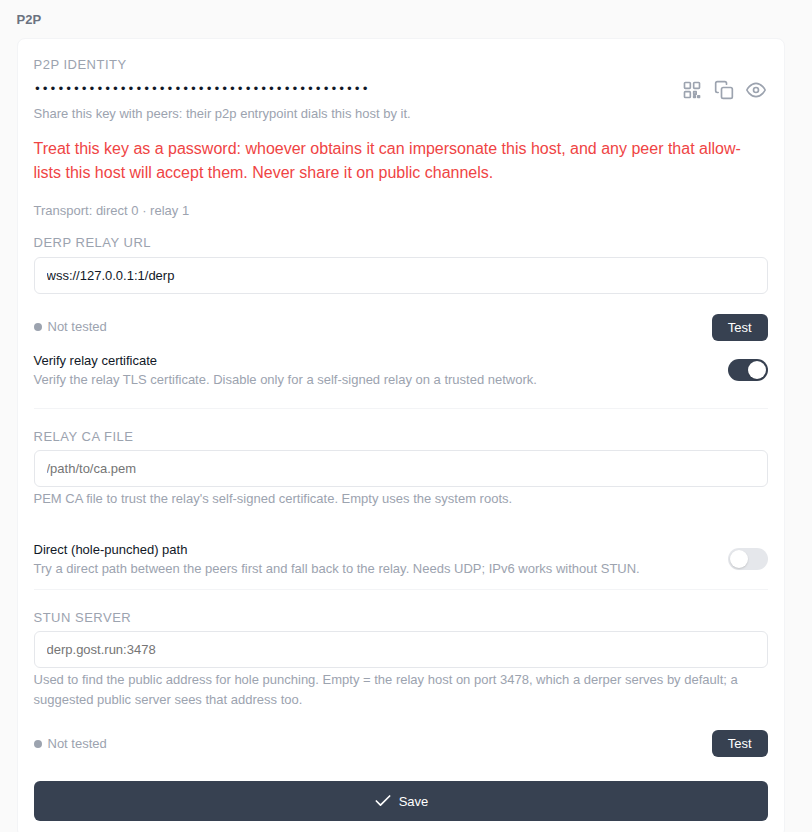
p2p is configured in the Wisper UI, not in a GOST config file. Settings → P2P holds the identity key, the relay URL, certificate verification, the direct-path toggle, and the STUN server. A p2p tunnel or entrypoint is then created like any other type, and its allowed peers are edited on the tunnel's peers page.

Wisper Settings, P2P section: identity key, relay URL, certificate verification, direct path toggle, and STUN server fields.
Settings → P2P. Set the relay, its certificate, the direct (hole-punched) path, and the STUN server. The identity key is the address peers dial.

End-to-end encryption

The data plane is encrypted end to end between the two peers — on the relay and on the direct (hole-punched) path, and for tcp and udp tunnels alike. The relay forwards the session's packets but holds no key that reads them.

Each pair of peers, on each transport, negotiates its own session key. A control frame sealed to the peer's static key carries an ephemeral X25519 public key; the two ephemeral keys derive a shared secret — X25519, then HKDF-SHA256 — into two directional chacha20poly1305 keys, and the multiplexed session runs over records sealed with them. The key material is per session, so a later leak of a peer's long-term key does not open earlier sessions.

Encryption is on by default; there is nothing to switch on. A peer that predates it never takes part in the handshake, and that session stays plaintext, so an older peer keeps working. The peers list shows the state per peer — encrypted, or plaintext when a peer fell back.

What the relay still sees is packet sizes and timing, not content. And because the handshake is negotiated, a relay that drops the handshake frames can force the plaintext fallback; that is indistinguishable from an older peer, and the peer's state shows it.

Security notes

The public key is the address. A DERP relay forwards only between peer keys, so a public client cannot reach a p2p tunnel. The whitelist is the only admission, and a peer that holds a listed key is treated as trusted.

The data plane is encrypted end to end — see above. The relay can drop the session's packets but cannot read them.

Wisper runs the endpoint in-process. There is no loopback gRPC control plane and no auth token to manage; the trust boundary is the process itself.